
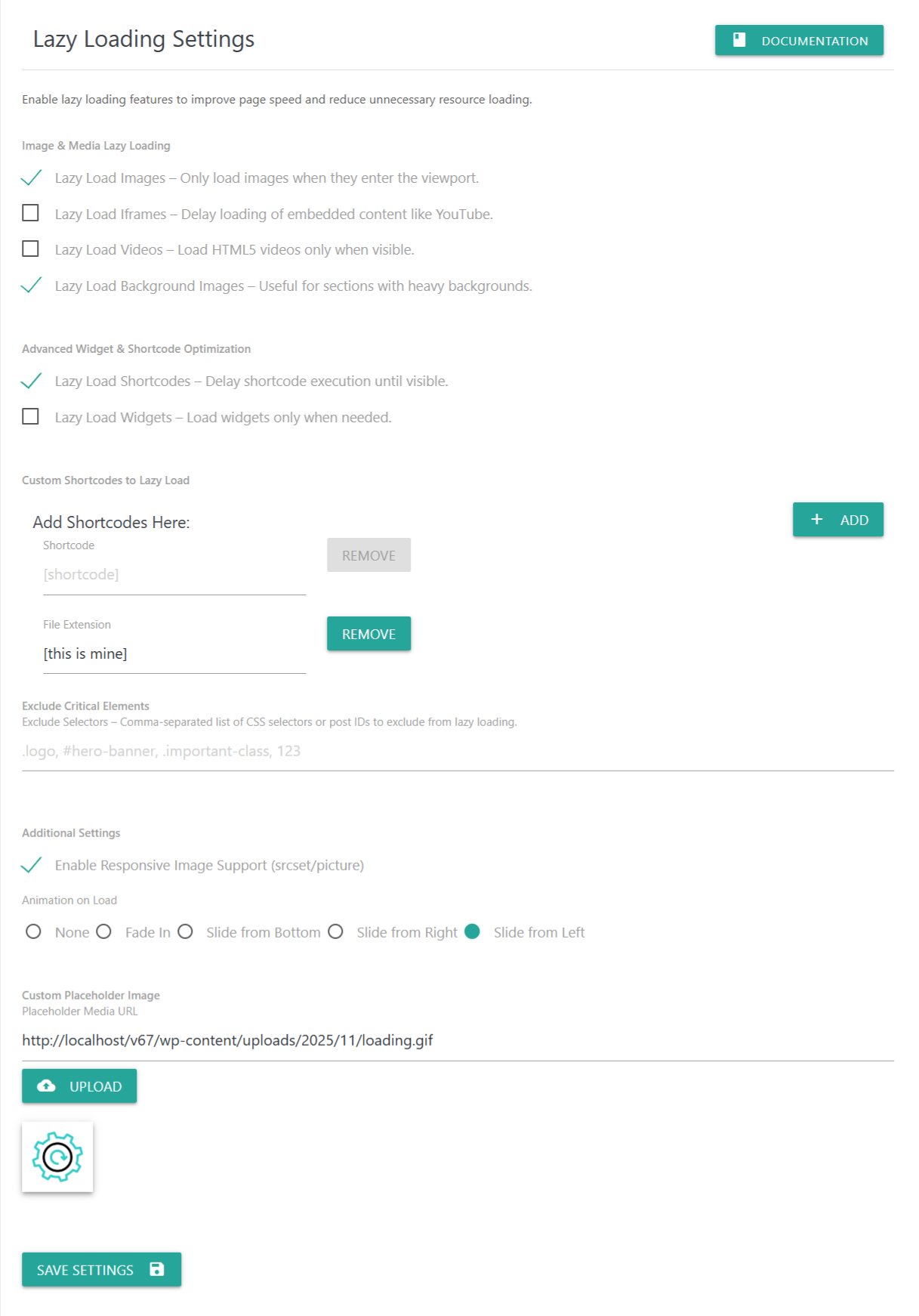
Lazy loading helps improve page speed by deferring the loading of images, videos, iframes, and widgets until they actually appear inside the user’s viewport. This reduces unnecessary resource loading and improves overall performance—especially on media-heavy pages.
📌 Image & Media Lazy Loading
Lazy Load Images
Loads images only when the user scrolls near them.
This reduces initial page weight and significantly improves Largest Contentful Paint (LCP).
Lazy Load Iframes
Delays loading of embedded content (e.g., YouTube, Vimeo, Maps) until visible.
Greatly improves page responsiveness and reduces early network requests.
Lazy Load Videos
Loads HTML5 video files only when visible on screen.
Useful for large promotional videos or background loops.
Lazy Load Background Images
Lazy loads CSS background images (e.g., hero banners, section backgrounds).
Ideal for visually heavy layouts.
📌 Advanced Widget & Shortcode Optimization
Lazy Load Shortcodes
Delays execution of shortcode output until the section becomes visible.
Recommended for expensive or dynamic shortcodes such as:
Gallery shortcodes
WooCommerce blocks
Contact Form 7 shortcodes
Elementor/Divi shortcode inserts
Lazy Load Widgets
Loads WordPress or theme widgets only when needed.
Useful for:
Sidebar widgets
Footer widgets
Elementor/Beaver widgets
📌 Custom Shortcodes to Lazy Load
Add specific shortcodes that should be lazy loaded.
Example input:
[my_shortcode]
You may also remove any added shortcode using the Remove button.
📌 Exclude Critical Elements
List CSS selectors or post IDs that should NOT be lazy loaded.
Examples:
.logo, #hero-banner, .important-class, 123
Useful for:
Logos
Above-the-fold images
First-screen hero sections
LCP elements
📌 Additional Settings
Enable Responsive Image Support (srcset/picture)
Keeps native WordPress responsive image features enabled during lazy loading.
Ensures browsers choose the best-size image for every screen resolution.
Animation on Load
Choose an animation effect when media becomes visible:
None
Fade In
Slide from Bottom
Slide from Right
Slide from Left
Animations help create a smooth, modern loading experience.
📌 Custom Placeholder Image
Use a custom placeholder while images are lazy loaded.
Examples:
A branded loading icon
A blurred tiny preview
A spinner GIF
To set a custom placeholder:
Click Upload
Select your placeholder from the Media Library
The URL will appear in the field below
The placeholder will be shown until the real image loads.
💾 Save Settings
Click Save Settings to apply your lazy loading configuration.
Your website will immediately begin lazy loading content based on your selections.