
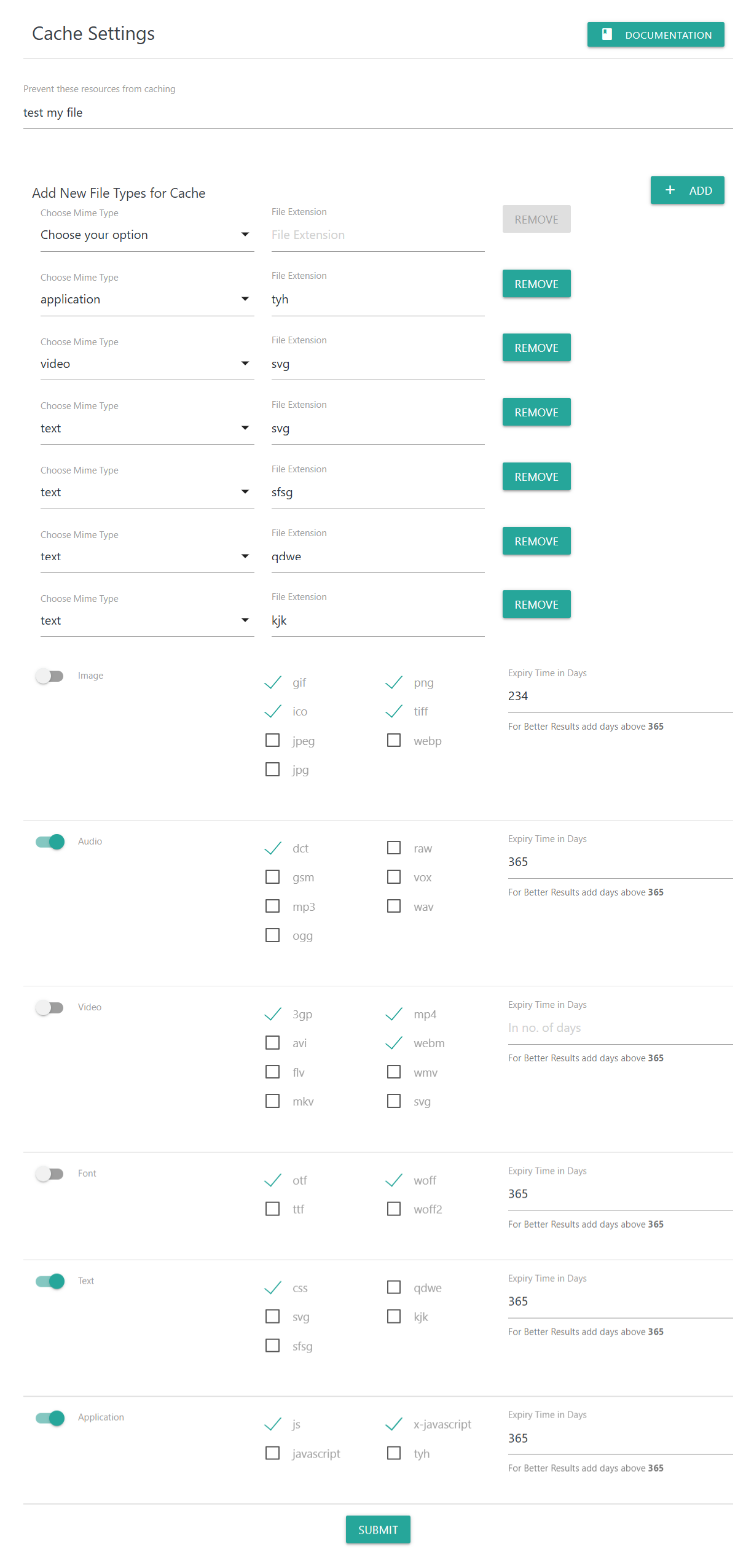
The Cache Settings panel allows you to customize which file types should be cached, how long they should stay in the browser cache, and which resources should be excluded. Proper configuration improves loading speed by reducing repeated downloads of static assets.
📌 Prevent These Resources From Caching
Use this field to specify any files or patterns that you do not want to be cached by the browser or CDN.
Examples:
test.js/wp-content/uploads/my-image.png*.json
Anything added here will always bypass caching.
📌 Add New File Types for Cache
This section lets you define custom MIME types and file extensions for caching.
How it works:
Choose a MIME type (e.g.,
text,video,application, etc.).Enter the file extension you want to add.
Click Add to insert it into the list.
Use Remove to delete items you no longer want cached.
This is useful when you need caching for less common file types (e.g., .tyh, .svg, .raw, etc.)
📌 Predefined MIME Categories
The plugin includes common MIME groups with checkboxes for popular file formats.
You can toggle entire sections ON/OFF and select only the extensions you want to cache.
1. Image Files
Includes:
gifpngicotiffjpegjpgwebp
Expiry Time in Days
Enter how long image files should remain cached.
Recommended: 365 days or more for high-performance caching.
2. Audio Files
Enable or disable caching for audio formats such as:
dctrawgsmmp3voxwavogg
Expiry Time: Set the number of days your audio files should stay cached.
3. Video Files
Supported formats include:
3gpmp4webmaviflvwmvmkvsvg(if video/svg is used)
Expiry Time: Choose how long to cache your video content.
Recommended: 365–730 days for streaming/marketing content.
4. Font Files
Supports:
otfttfwoffwoff2
Expiry Time:
Recommended: 365–730 days (fonts rarely change and benefit from long-term caching).
5. Text Files
Works with:
csssvgsfsfqdwwekjk
(and any custom types you’ve added)
Expiry Time:
Best practice: 7–30 days, unless they are stable assets.
6. Application Files
Includes application-based formats such as:
jsjavascriptx-javascripttyh(custom)
Expiry Time:
Suggested: 7–30 days, depending on update frequency.
📌 Expiry Time in Days – How It Works
The expiry field tells the user’s browser how long to keep the file cached before checking the server for updates.
Shorter time (1–30 days): Use for dynamic or frequently changing assets.
Longer time (365+ days): Best for stable static assets like images, fonts, and videos.
A helpful reminder appears:
“For better results add days above 365.”
📌 Save Your Changes
Click Submit to apply all caching rules.
Your website will immediately start delivering files with the updated caching headers.